
The CSV you are about to drop into a free converter is rarely just a CSV. It is a customer list, a payroll export, or a few thousand survey answers with names and email addresses attached. You can turn it into JSON, and back, without sending it anywhere.
Why not just use an online converter?
Online converters work, and most of them are run by people with no interest in your data. The problem is that you can't check. Uploading a file means a copy now sits on a server you know nothing about.
- It is kept for as long as they decide. Retention is set by the site's own policy, if it has one, and may include backups and logs.
- It lives where they host it. That may be a country whose data protection rules differ from yours.
- You can't take it back. Deleting the file on your Mac does nothing to the copy that was uploaded.
For personal data this is more than a feeling. Under the EU's GDPR, sending customer or employee records to a service you have no data processing agreement with can be a compliance problem on its own, whatever that service does next. Client work is often covered by confidentiality clauses, and research data by ethics approvals that say exactly where it may be stored.
Converting locally removes the question. The file never leaves your Mac, so there is nothing to check.
Ways to convert CSV and JSON on a Mac without uploading
1. Terminal with Python: free, already on most Macs
Open Terminal, go to the folder with your file, and run this to turn
data.csv into data.json:
python3 -c 'import csv, json, sys; json.dump(list(csv.DictReader(open(sys.argv[1], newline="", encoding="utf-8-sig"))), open(sys.argv[2], "w", encoding="utf-8"), indent=2, ensure_ascii=False)' data.csv data.jsonAnd this goes the other way, from a JSON array of objects to CSV:
python3 -c 'import csv, json, sys; rows = json.load(open(sys.argv[1], encoding="utf-8-sig")); w = csv.DictWriter(open(sys.argv[2], "w", newline="", encoding="utf-8"), fieldnames=list(dict.fromkeys(k for r in rows for k in r))); w.writeheader(); w.writerows(rows)' data.json data.csv
macOS doesn't include a full Python on its own. The first time you run
python3, your Mac offers to install Apple's Command Line Tools,
which include it. Both commands expect comma-separated files, and the JSON one
expects a flat list of objects.
2. Terminal with jq: JSON to CSV in one line
jq is a small tool for reshaping JSON. Recent versions of macOS
include it, and on older ones you can install it with Homebrew using
brew install jq. This writes a CSV with a header row taken from
the first record:
jq -r '(.[0] | keys_unsorted) as $cols | $cols, (.[] | [.[$cols[]]]) | @csv' data.json > data.csv3. Miller: the power-user option
Miller is a command-line tool built for CSV, TSV and JSON. Install it with
brew install miller, then convert in either direction:
mlr --icsv --ojson cat data.csv > data.json
mlr --ijson --ocsv cat data.json > data.csv
Miller flattens nested JSON into columns such as address.city
when it writes CSV, which some people want and others don't. More on that in
what changes in the conversion.
4. Numbers and Excel: they can't export JSON
Both open CSV files well, and both can save a spreadsheet as CSV. Neither can export JSON, so they don't help with this conversion.
5. 2anything: no Terminal, and many more formats
Full disclosure: we make 2anything. If you are comfortable in Terminal, the free methods above do the job. 2anything is for when you don't want to write commands, or when your data arrives as Excel, Parquet, SPSS or SQLite as well as CSV.
- Drop one or more CSV files onto 2anything.
- Choose JSON, or JSON Lines for one record per line.
- Click Convert. The JSON file appears next to the original.
JSON to CSV works the same way. It also has a command-line form, which handles batches:
2anything data.csv --to json
2anything *.csv --to json
2anything export.json --to csv
The conversion runs entirely on your Mac and makes no network calls.
What happens to your data in the conversion
CSV and JSON look interchangeable, but they describe data differently. A CSV file is a flat grid of text. JSON has named fields, types such as numbers and true or false, and values that can nest inside each other. Converting means deciding how one shape fits into the other.
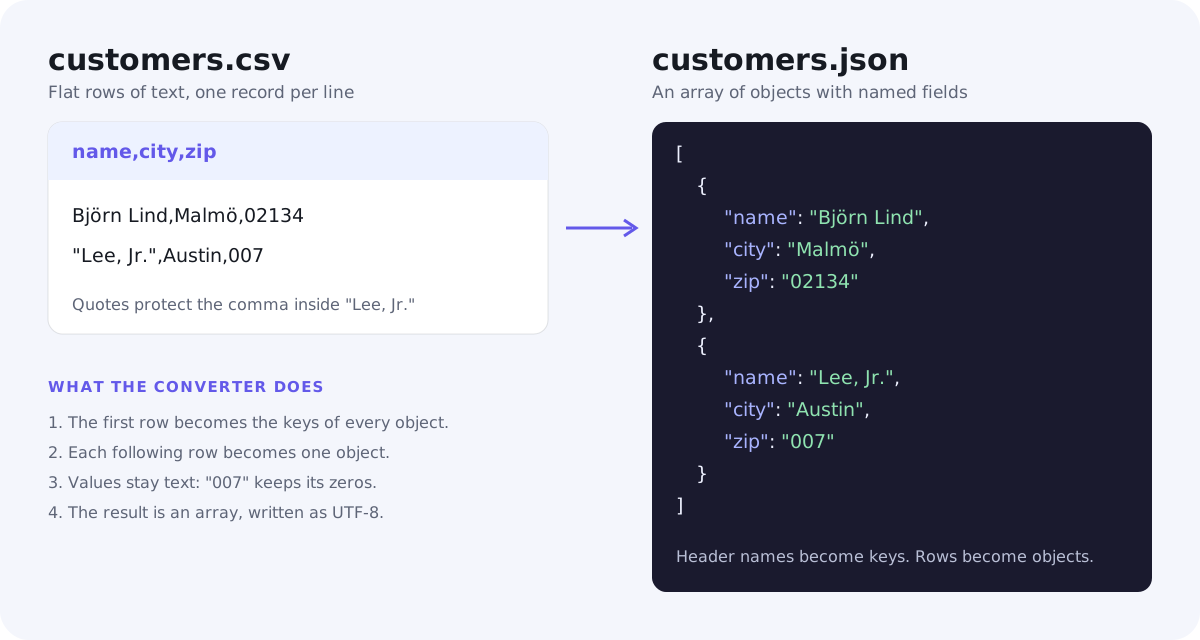
CSV to JSON
- Rows become objects. The first row is treated as the header, and each later row becomes one object whose keys are those header names.
- Values stay as text. In 2anything,
34becomes"34"and an empty cell becomes"". That is deliberate. Nothing is silently rewritten, so ZIP codes and IDs like007keep their leading zeros, which is exactly what Excel loses when it opens a CSV. - Messy headers are repaired. A blank header becomes
column_1, and a repeated name gets a number added so no field overwrites another. - Ragged rows are kept. A row with too few cells is padded with empty values, and extra cells are not thrown away.
- The output is readable. JSON is indented by two spaces and keeps characters like ö and € as they are, with settings for a different indent or compact output.
JSON to CSV
Going back is harder, because JSON can hold things a grid can't. 2anything accepts four common shapes:
- an array of objects, the usual export format
- a single object, which becomes one row
- a wrapper with one key holding the list, such as
{"users": [...]}, which is unwrapped for you - JSON Lines, with one object per line
The columns are every key that appears in any record, in the order they first
appear. A field that only some records have still gets a column, and the rest
are left empty. A null also becomes an empty cell.
Nested data stays nested. If a record contains an object or a list, such as an address, 2anything writes it into a single cell as JSON text:
name,address,phone
Ana,"{""city"": ""Paris"", ""zip"": ""75001""}",
Bob,,555
Tools like Miller take the other approach and spread it into
address.city and address.zip columns. That is easier
to sort in a spreadsheet but can turn a list into dozens of columns. Keeping
the JSON in one cell loses nothing, and you can parse it back later. The CSV is
written as comma-separated UTF-8. Choose TSV if you want tabs instead.
Semicolons, tabs and odd characters
"CSV" is less of a standard than it sounds. In much of Europe, where the comma is the decimal separator, Excel exports with semicolons instead. Older Windows software saves text as Windows-1252 rather than UTF-8, which turns names like Björn into garbage when read the wrong way. And many Windows tools start files with a byte order mark, three invisible bytes that can end up glued to your first column name.
2anything handles these for you:
- The delimiter is detected automatically. Comma, semicolon, tab and pipe all work, and quoted values such as
"Lee, Jr."keep their commas. - Encoding is detected too. It reads UTF-8 first and falls back to Windows-1252, and it never stops halfway because of one bad byte.
- Byte order marks are removed, so your first column is called
name, not something invisible in front of it.
Other data formats you can convert the same way
The same privacy argument applies to every data format, and most people meet more than CSV and JSON. These conversions run locally in 2anything as well.
| Format | Converts to and from | Good to know |
|---|---|---|
| Excel (.xlsx, .xlsm) | CSV, JSON, SQLite | Excel to CSV takes one sheet, the active one or one you name. Dates come out as YYYY-MM-DD. Excel to SQLite turns every sheet into its own table. |
| YAML | JSON | Converts both ways with the full nested structure intact. |
| JSON Lines | JSON, CSV | One record per line, common in logs and data pipelines. Converts to JSON with nothing lost. |
| XML | JSON | Works for simple XML where each child of the root is one record. Attributes and deeper nesting aren't mapped. |
| SQLite | CSV, JSON, Excel | SQLite to Excel gives one sheet per table. |
| Parquet, Feather, Arrow | CSV, JSON | Read and write, with a choice of compression. Parquet to CSV is a quick way to look inside a data-lake file. |
| SPSS (.sav, .zsav, .por), Stata (.dta), SAS (.xpt) | CSV, JSON | Value labels are applied by default, with an option to keep the raw codes. SAS .sas7bdat files can be read but not written. |
Survey and research data is where local conversion matters most, because it is usually personal and often under an ethics approval. The data use case page lists every data format 2anything reads and writes.
CSV and JSON FAQ
Does CSV to JSON keep numbers as numbers?
In 2anything, no. Every value is written as text, so 34 becomes
"34". A CSV file has no types, so any converter that produces
numbers is guessing, and guessing is how 007 turns into
7. If you need real numbers, convert them in the program that
reads the JSON, where you know which columns they are.
What happens to nested JSON when I convert to CSV?
Each nested object or list is written into one cell as JSON text. Nothing is lost, and the cell can be parsed back into the original structure.
Can I convert a 1 GB CSV?
Usually, yes. The file is loaded into memory to convert it, so very large files are limited by how much memory your Mac has.
Is converting in Terminal really offline?
Yes. The Python, jq and Miller commands above read and write files on your Mac and don't use the network. The only time they touch the internet is when you install them.
Does 2anything need the internet?
Not to convert. Every data conversion runs on your Mac without network calls. The privacy policy explains the little the app and website do collect.
Can I convert a whole folder at once?
Yes. Drop all the files onto 2anything together, or run
2anything *.csv --to json in the folder. Each file is converted
next to its original.
The short version
Converting CSV to JSON is simple. Each row becomes an object, keyed by the header. Going back has to decide what to do with nested data. You don't need to upload anything to do either: Python, jq and Miller handle it for free in Terminal, and 2anything does it without commands, along with Excel, SQLite, Parquet and research formats. If the file contains people, keep it on your Mac. You can also read our guide to converting HEIC photos to JPG.