
A reader dropped a 184-page PDF onto 2anything, chose MP3, and waited. Three hours later the progress bar was still moving and there was no audio file. That report turned into two things: a fix for text-to-speech on long documents, and a proper audiobook converter that turns a PDF, Word file or EPUB into an M4B with chapters you can skip between. Both ship in version 0.23.
What you get
Before 0.23, converting a PDF to audio meant turning it into plain text and handing that text to the Mac's speech engine in one go. The text step threw away everything a narrator needs: headings became ordinary paragraphs, page numbers became lone lines that were read out as "forty-seven", and every image became an empty pair of square brackets. The audio was one long track with no way to find your place.
The new converter produces an audiobook that behaves like one:
- Chapter markers. Apple Books, the Books app on iPhone, and audiobook players like BookPlayer show the chapter list and let you skip between chapters.
- Title, author and cover. Read from the PDF's metadata or the Word file's properties, with the first page of a PDF rendered as the cover. The file is tagged with the Audiobook genre, so apps file it with your other audiobooks rather than your music.
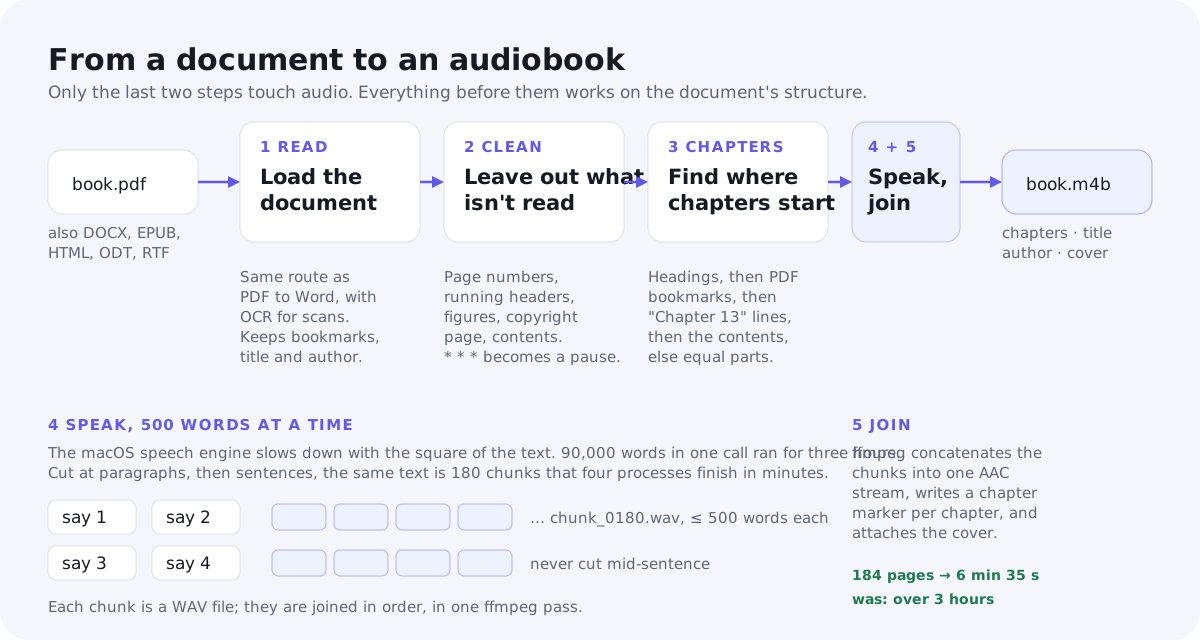
- Clean narration. Page numbers, running headers, the copyright page, the printed table of contents and figure placeholders are left out. Scene breaks become a pause.
- Spoken chapter titles. Each chapter opens with its title, "Chapter Two: The Click", followed by a short pause, the way a narrator would read it.
- A conversion that finishes. The book that used to run for over three hours now takes six and a half minutes.
It reads PDF, DOCX, EPUB, HTML, ODT and RTF, and writes M4B, the audiobook flavour of the MP4 container. Speech comes from the voices built into macOS, so everything runs on your Mac. Scanned PDFs are recognised with OCR first, the same way they are when you convert a PDF to Word.
How to make an audiobook from a PDF
- Drop the PDF, EPUB or Word file onto 2anything.
- Choose M4B.
- Click Convert. The audiobook appears next to the original, with the same name.
The voice is picked automatically from the language of the text. From the command line, the same conversion is:
2anything book.pdf --to m4bThree options are available on the command line. They aren't in the menubar app yet.
2anything book.pdf --to m4b --set voice Samantha
2anything book.epub --to m4b --set bitrate 96k
2anything notes.docx --to m4b --set chapter_minutes 30- voice is any voice installed on your Mac. The default is auto-detect.
- bitrate is the AAC bitrate, from 32k to 128k. The default of 64k is plenty for a mono voice; a nine-hour book comes to about 250 MB.
- chapter_minutes only matters when the document has no recognisable chapters. The text is then cut into evenly sized parts of about this length, 20 minutes by default.
The conversion takes a few minutes for a novel. The menubar app shows its usual time estimate but no chapter-by-chapter progress yet; see what it doesn't do yet.
Why a long PDF took three hours to read aloud
2anything's text-to-speech uses the speech engine built into macOS, driven
through the say command. It is fast on a paragraph. It turns out
to be very slow on a book, and not in the way you would expect.
The time say needs doesn't grow in proportion to the text. It
grows faster than that. Measured with the Samantha voice on a 10-core
Apple Silicon Mac:
| Words in one call | Time to synthesise | Audio produced |
|---|---|---|
| 250 | 1.7 s | 1 min 25 s |
| 500 | 2.5 s | 2 min 58 s |
| 1,000 | 4.7 s | 5 min 57 s |
| 1,500 | 7.4 s | 8 min 48 s |
| 3,000 | 19 s | |
| 6,000 | 60 s | |
| 12,000 | 3 min 33 s | |
| 90,794 (the whole book) | over 3 hours, never finished | about 8.5 hours |
Up to about a thousand words the cost is linear: twice the text, twice the time, and the engine runs at roughly 70 times real time. Beyond that, doubling the text roughly triples the time. The speech engine is doing some work over the whole input for every piece of it, so the total grows with the square of the length. Hand it 500 words and it is done before you look up. Hand it 90,000 words in one call and it is still running three hours later.
The output format made no difference. WAV, AIFF or M4A all took the same time, so the cost is in processing the text, not in writing the audio.
The fix: 500 words at a time, four at a time
If small calls are cheap and big calls are ruinous, the answer is to never
make a big call. 2anything now cuts the narration into chunks of at most 500
words before synthesis, and runs up to four say processes at
once.
The cuts are chosen so you can't hear them:
- At paragraph boundaries first. Only a paragraph longer than 500 words is cut at a sentence boundary, and only a single sentence longer than that is cut at a space.
- Never inside a speech command. The pause marker that stands in for a scene break is one token and stays whole.
- No chunk shorter than 50 words, except the last. A stray short chunk is rebalanced with the one before it.
- A 4,000-character cap as well, because Chinese and Japanese text has no spaces and would otherwise count as one enormous "word".
Each chunk becomes a WAV file, and the files are joined in order. For an audiobook, ffmpeg joins them while encoding to AAC and writing the chapter markers. For a plain text file going to MP3 or WAV, the chunks are concatenated and encoded as before.
Four workers were measured at about 2.7 times the throughput of one. The cap is four rather than one per core so the Mac stays usable while a book narrates. On the book that triggered all this:
| Before | After | |
|---|---|---|
| PDF to audio, wall time | over 3 hours, never finished | 6 min 35 s |
| Chapters | none | 32, all 25 numbered chapters with their subtitles |
| Read aloud by mistake | page numbers, "[]", the copyright page, the contents | nothing |
The chunking is shared with the existing text-to-speech converter, so a long TXT or Markdown file going to MP3 gets the same speed-up. And because a PDF going to MP3 now routes through the audiobook converter first, it gets the cleaned narration too, just without chapter markers, since MP3 has none.
What a narrator leaves out
A human narrator doesn't read the page numbers, the book title printed at the top of every page, or the ISBN. The converter works from the same structured document model that PDF to Word produces, and runs a fixed set of rules over it before any speech happens. Each rule is deliberately conservative: a wrong guess costs one sentence, not a chapter.
- Figures are dropped. A caption, if there is one, is kept as a paragraph.
- Tables are read one row at a time, cells separated by commas. Lists become their items.
- Page numbers. A paragraph that is only a number, Arabic or Roman, is a candidate. Candidates are removed when at least five of them form a rising sequence, each within one to three of the last. A lone "1984" in the prose isn't a sequence and stays.
- Running headers and footers. A short line, eight words or fewer, that sits at the top or bottom of a page and recurs on at least 30% of pages is removed everywhere. Digits are ignored when comparing, so "page 3 of 12" and "page 4 of 12" count as the same header.
- Hyphenation. Words broken across lines, "quota-" and "tions", are rejoined. Soft hyphens and typographic ligatures are normalised so the voice doesn't stumble.
- Scene breaks. A line of asterisks or dashes becomes a 1.2-second pause.
- The copyright page. A page in the first tenth of the book that carries at least two of "copyright ©", "all rights reserved", "ISBN", "first edition" or "published by" is dropped whole.
- The printed table of contents. A page where most lines are short and at least three look like chapter entries, or end in rising page numbers, is dropped from the narration. Its entries are kept, because they are useful for finding chapters.
What was dropped, and how much of it, is reported in the conversion details and the log, so if a rule misfires on your book there is a trace to point at.
How chapters are found
There is no single reliable signal for where a chapter starts. A PDF exported from Word may carry real heading styles. A PDF from a typesetting tool may carry bookmarks instead. A PDF printed from a browser carries neither, just a line that says "Chapter Two" in the same font as everything else. So the converter tries five strategies in order and takes the first whose result passes a sanity check.
- Headings. Level-1 headings open chapters. If there are none, or too few to pass the check below, level-2 headings do. A heading that has no text of its own before the next one, "Part One" right above "Chapter 1", is folded into that chapter's title.
- PDF bookmarks. The outline you see in Preview's sidebar. Each bookmark title is matched, ignoring case and punctuation, against short paragraphs in reading order. If fewer than half the bookmarks can be found in the text, the outline is judged not to describe this document and is skipped.
- Chapter lines. A short paragraph that starts with Chapter, Part, Book, Act, Interlude, Prologue, Epilogue, Introduction, Preface, Foreword, Afterword or Appendix, with or without a number. If the next line is short and doesn't end like a sentence, it is the subtitle, so "Chapter Two" followed by "The Click" becomes the chapter "Chapter Two: The Click". A bare Roman numeral followed by such a subtitle counts too. The layout engine sometimes fuses a heading, its subtitle and the first sentence into one paragraph, "Chapter Five The First Night It was late November", and the converter separates them by where the title-case words stop.
- The table of contents. The entries saved from the cleanup step are matched against the text the same way bookmarks are.
- Equal parts. If nothing else works, the text is cut at paragraph boundaries into parts of about 20 minutes each, at 150 words a minute. They are labelled "Part 1", "Part 2" and so on, and these labels aren't spoken, since they aren't the author's.
The sanity check rejects a result with fewer than two chapters, a median chapter under 300 words, more than one chapter per 150 words of text, or a single chapter holding over 60% of the book. "Chapter" is a common enough word at the start of a sentence, "Part of me wanted to leave", that the line-matching rules also require a short line that doesn't end in a full stop.
Anything before the first chapter, a dedication or a preface without a heading, becomes a chapter called "Front matter" if it is at least 150 words. Shorter front matter is simply read at the start of chapter one.
The book that triggered the work was the hard case: generated by a typesetting tool with no bookmarks, no bold, one font size throughout, and each chapter opening with "Chapter Two" on one line and the title on the next. The chapter-lines strategy found all 25 numbered chapters, their subtitles and the interludes between them.
Which voice reads it
With the voice set to auto-detect, the converter detects the language of the whole text and picks the best installed voice for it, preferring Premium and Enhanced voices over the compact ones. You can install better voices under System Settings › Accessibility › Spoken Content. Apple's Premium voices are a real step up for long listening, and they are a one-time download.
Language detection also got more careful in this release. The previous detector used a lightweight model over every language it knew, and it decided an English security report was German because a product name repeated on every page. It now uses the full model, restricted to the languages macOS has voices for, and only trusts a result it is at least 50% confident in. Below that, it uses English.
What it doesn't do yet
- No chapter-by-chapter progress in the menubar. You get the usual time estimate, and you can't cancel between chunks. A novel takes a few minutes, so this is tolerable rather than good.
- No chapter review. Detection is automatic and there is no screen to rename, merge or split chapters before narration starts. The chapter titles and the strategy used are in the conversion details afterwards.
- Plain text and Markdown to M4B have no chapters. Those formats still go through the text-to-speech converter, which produces one flat recording.
- Parts can win over chapters. A book whose "Part One" and "Part Two" headings sit a level above its chapter headings can come out with one chapter per part.
- EPUB covers aren't read. A PDF's first page becomes the cover. EPUB, DOCX and the others get no cover for now.
- Voice, bitrate and part length are command-line options, not controls in the menubar app.
- Temporary disk space. The chunks are kept as uncompressed audio until the final file is written, about 2.6 MB per minute. A nine-hour book needs around 1.4 GB free while it converts.
Audiobook FAQ
Where can I play an M4B file?
Apple Books on Mac, iPhone and iPad, and most dedicated audiobook players. Chapter markers, title, author and cover all show up. VLC plays M4B too but shows chapters only in its playback menu.
Can I get an MP3 instead?
Yes. Choose MP3, WAV, FLAC or any other audio format as the target. You get the same cleaned narration and the same speed, but no chapter markers, because those formats don't have any.
Does it work on scanned PDFs?
Yes. The pages are recognised with OCR first, using the engine built into macOS. The quality of the narration follows the quality of the scan.
How long does it take?
About 75 times faster than real time on an Apple Silicon Mac. The 184-page book, about eight and a half hours of audio, took six and a half minutes.
What if the chapters come out wrong?
The conversion details list which strategy was used and the chapter titles it
found. If a book falls through to equal parts, set chapter_minutes
to the part length you prefer. If you have a document that is split badly,
send it over; the heuristics improve with every odd book they meet.
Is anything uploaded?
No. The document is read, cleaned and narrated on your Mac, using the voices macOS ships with. See the privacy policy for what the app and website collect.
The short version
2anything 0.23 turns a PDF, Word file or EPUB into an M4B audiobook with chapter markers, title, author and cover, narrated by the voices built into your Mac. Page numbers, headers, the copyright page and the contents aren't read aloud. The three-hour hang on long documents is gone, because the speech engine's cost grows with the square of the text and the text is now spoken 500 words at a time, four chunks at once. For the other audio and speech features, see the podcaster use case page.